


UKG Ready
4.78.89K Reviews
App Specs
- Version
- 1.106.5
- Updated On
- License
- Free
- Downloads
- 1,000,000+
- Developer
- UKG, Inc.
- Categories
- Business
- Platform
- Android, iOS
Screenshots
 Analysis by AppCompare
Have you ever been caught in the whirlwind of managing your work schedule, tracking your time, or just trying to keep up with everything HR-related? If you have, then you've probably wished for an app that could just make life a little easier. Well, let me introduce you to UKG Ready. This app promises to streamline workforce management, and I’ve taken a deep dive into its features to see if it really lives up to the hype.
Getting Started with UKG Ready
First things first, downloading UKG Ready is a breeze. It’s available on both Android and iOS, so no matter your device, you’re covered. Once you open the app, you’re greeted by a clean and intuitive interface. I was pleasantly surprised by how easy it was to navigate. Everything is laid out in a way that just makes sense, even if you’re not exactly a tech wizard.
Setting up your account is straightforward. You’ll need to input some basic details and, depending on how your company has set things up, you might be asked to link to your employer’s system. This part was seamless for me, and I could immediately see my work schedule and other relevant information.
Features That Make Life Easier
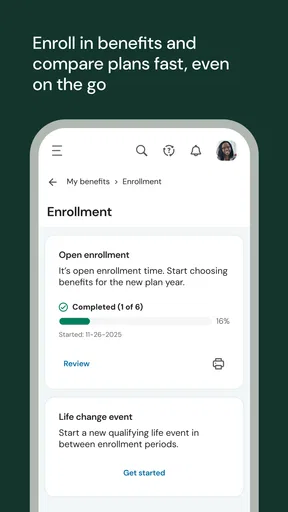
Once you’re in, you’re hit with a suite of features designed to make your work life a whole lot easier. The app offers everything from time-tracking to schedule management, and even payroll features. Here’s a quick rundown of what I found most useful:
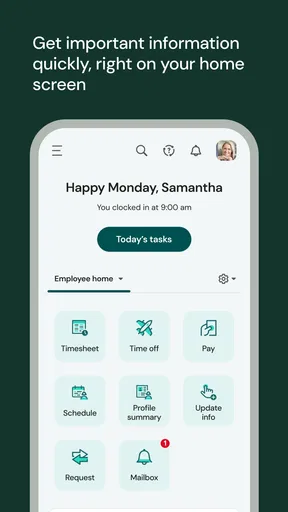
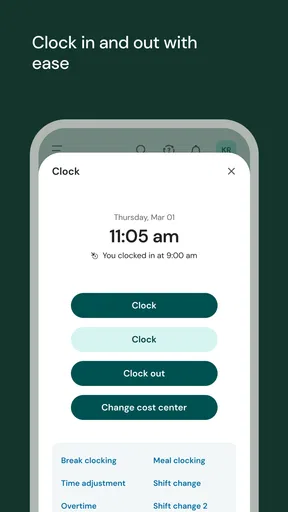
- Time Tracking: Clocking in and out is as easy as tapping a button. You can even add notes to your entries, which is great if you need to remember why you left early or stayed late.
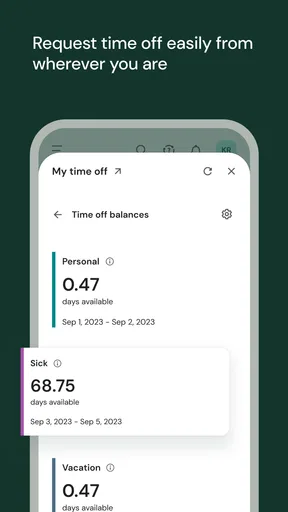
- Schedule Management: Viewing your schedule has never been easier. It’s like having your work planner right in your pocket. You can also request shift swaps or days off directly through the app, which is a massive time-saver.
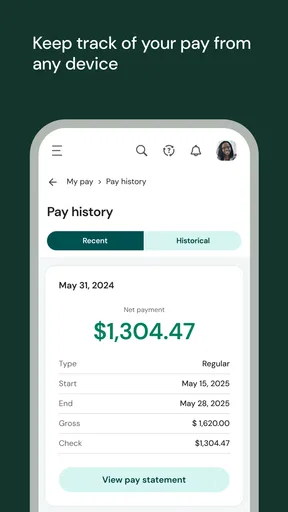
- Payroll Access: Want to check your last paycheck? No problem. The app offers easy access to your payroll information, so there are no surprises when payday comes around.
When the Connection Is Part of the Workflow
UKG Ready is most useful when you can reach your employer’s configured system at the moment you need it. Checking a shift before leaving home, submitting a time entry at work, or looking up payroll information all depend on having access to your organization’s setup. I would treat it as a practical front door to workplace information, not as a standalone planner that can replace your employer’s process.
That distinction matters if you work in a place where reception is unreliable. A worker heading into a basement, warehouse, or remote site may want to check the day’s schedule before arriving rather than assume it will be available at the last minute. For time-sensitive actions, I’d make a habit of confirming that a change or request has actually gone through instead of relying on a tap alone. A screen interaction is not the same thing as approval from a manager.
Useful in the Middle of a Working Day
The strongest case for a mobile workforce app is not that it puts every HR task on a phone; it is that it can cut out small detours. Imagine finishing a shift and realizing you need to ask for a day off. Rather than waiting until you are back at a computer, you can use the app to start the request while the dates are fresh in your mind. You still need to follow your employer’s rules and wait for the appropriate decision, but capturing the request promptly can make the process easier to track.
Worth Reading Before You Choose

EA SPORTS FC Mobile 26 Is a Bigger Football Game, but It Takes Time

Flipboard Shows What News Apps Must Do Beyond the Feed

Switching to Android Auto Means Rethinking Your Driving Routine

Google Calendar Makes a Crowded Week Easier to Manage

Ludo King Makes the Most of the Minutes Between Plans

Baby Panda World Brings Quick Play to Modern Phones, but Its Game Library Feels Busy
It can also help when a schedule changes while you are away from your usual desk. If notifications are enabled and your employer has configured the relevant communication, an alert may give you a timely prompt to check the details. I would still open the schedule itself before making plans: a notification is a useful nudge, while the current schedule is the place to verify what you are expected to work.
The User Experience
One of the things I truly appreciate about UKG Ready is how user-friendly it is. The app doesn’t bombard you with unnecessary features or clutter. Everything is where you expect it to be, which makes using it a pleasure rather than a chore. The design is sleek and modern, with a focus on functionality.
The app also supports notifications, which I found to be a lifesaver. Whether it’s a reminder about an upcoming shift or an alert about a schedule change, you’re always in the loop. It’s like having a personal assistant who never takes a day off.
What to Do When Something Does Not Load
Because the app connects to a system configured by your employer, a sign-in or loading problem may not be something you can fix entirely on your own. I’d start with ordinary checks: confirm the phone has a working connection, reopen the app, and make sure you are using the correct account details. If the issue persists, contacting your workplace’s HR or system administrator is more useful than repeatedly trying the same step, especially if access depends on how the organization has set things up.
For a shift or time-sensitive task, it is sensible to keep a separate note of what you need to report until you can confirm it has been recorded. That is not a substitute for your employer’s timekeeping process; it is a simple way to avoid relying on memory when connectivity or access gets in the way. If you are unsure whether a clock-in, request, or schedule change saved, check the relevant screen again or ask the appropriate person at work rather than assuming it did.
Why You Might Love It
Let’s talk about why UKG Ready could become your new favorite app. If you’re someone who juggles multiple tasks at work, this app is going to be your best friend. It cuts down on the time you spend managing your schedule and tracking your hours, giving you more time to focus on the actual work. Plus, the convenience of having everything in one place is hard to beat.
I also found that it reduced the stress of potential miscommunication with HR or management. Everything is documented, and changes are clearly communicated through the app. For those of us who have ever been caught off guard by a schedule change, this is a game changer.
Who Benefits Most, and Who May Prefer Another Approach
I’d recommend it most to employees whose workplace already uses UKG Ready and has enabled mobile access. It makes particular sense for people who regularly check shifts, record work time, or need to look at payroll information without sitting at a work computer. UKG, Inc. develops the app, but your employer’s configuration shapes what you can actually use, so access is the first practical question to settle.
If your employer does not use UKG Ready or has not configured it for mobile, installing the app alone will not give you a personal schedule or HR account. And if you only need a private calendar, a regular calendar app is likely simpler: it can hold personal reminders without depending on a workplace system. The trade-off is that a personal calendar will not be the authoritative place for employer-managed shifts, time records, or requests.
For employees whose workplace has enabled it, the app is free and is rated for Everyone. Its average rating is 4.7 from around 34,000 ratings, with more than a million installs. Those figures suggest broad use, but they do not guarantee that every employer has enabled the same options or that a particular account will work smoothly. I’d judge it by whether your organization’s setup covers the tasks you personally need.
Keeping Use Practical and Data-Conscious
When an app brings work schedules, time records, and payroll information together, I think it is worth being deliberate about where and when you check it. I would avoid opening sensitive work details on a shared device, and I would lock my phone when I put it down. These are sensible habits for any work account, not a claim about a specific security feature.
Notifications are convenient, but they can also surface work reminders when you would rather keep your screen private. If that matters to you, review the notification settings available on your phone and choose what fits your routine. A useful compromise is to allow prompts that help you notice schedule changes while checking detailed information inside the app when you are ready to do so.
The current version is 1.104.5, and the app requires Android 11 or later. Before installing, I’d check that your phone meets that requirement and confirm with your employer that mobile access is enabled. This small check can prevent the frustrating situation of downloading an app only to discover that the missing piece is workplace configuration rather than anything you did wrong.
Final Thoughts
In the end, UKG Ready delivers on its promise to simplify workforce management. It’s intuitive, comprehensive, and incredibly user-friendly. Whether you're clocking in, checking your pay, or managing your schedule, this app covers all the bases.
If you’re looking for a way to streamline your work life and get a better handle on your schedule, I’d definitely recommend giving UKG Ready a try. It’s like having an HR department right in your pocket, always ready to help, and that’s something we could all use a bit more of.
My Connectivity Verdict
For me, the app’s real value is access to employer-managed information while I’m away from a desk, provided my workplace has configured it and I can connect when needed. It is not a replacement for confirming important changes, following local procedures, or asking HR when a record looks wrong. If you want a personal planner independent of your employer, choose a standard calendar; if your work already runs through UKG Ready, the mobile app can make routine checks and requests much more convenient.
Pros
- User-friendly interface for easy navigation.
- Comprehensive time-tracking features.
- Seamless integration with payroll systems.
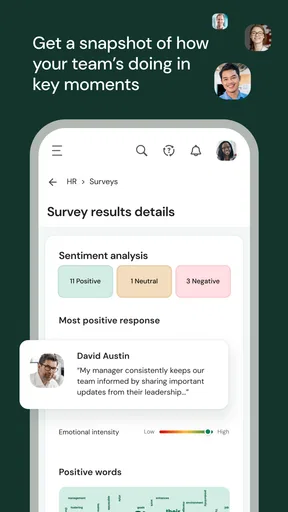
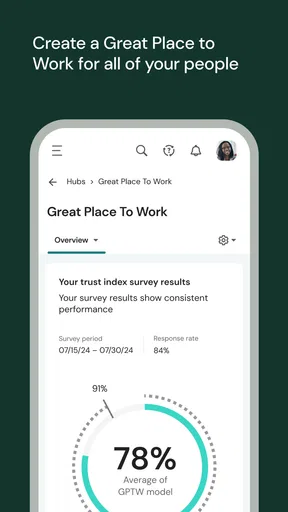
- Customizable dashboards for quick insights.
- Efficient mobile app for on-the-go access.
Cons
- Limited offline functionality.
- Occasional sync issues with some devices.
- Customization options can be overwhelming.
- Initial setup can be time-consuming.
- Requires regular updates for optimal performance.
FAQs for UKG Ready
What is UKG Ready, and how does it benefit my organization?
UKG Ready is a comprehensive workforce management solution designed to streamline HR, payroll, and timekeeping processes. It benefits organizations by automating routine tasks, improving accuracy in payroll, and providing insightful analytics for better decision-making. This leads to enhanced productivity and compliance, ultimately saving time and reducing operational costs.
Is UKG Ready user-friendly for employees and administrators?
Yes, UKG Ready is designed with an intuitive interface that caters to both employees and administrators. Employees can easily clock in/out, request time off, and access their schedules. Administrators benefit from straightforward dashboard navigation, making it simple to manage payroll and HR tasks without extensive training.
Does UKG Ready integrate with other systems?
UKG Ready offers robust integration capabilities with various HR, financial, and business systems. This means you can seamlessly connect it with existing platforms such as ERP systems, ensuring data consistency and reducing the need for manual data entry. This integration supports a more cohesive workflow across your organization.
What kind of customer support is available for UKG Ready users?
UKG Ready provides comprehensive customer support, including 24/7 access to a knowledgeable support team via phone, email, or chat. Additionally, users have access to an extensive library of resources, including tutorials, FAQs, and community forums to help resolve issues and maximize the use of the platform.
Is UKG Ready secure, and how does it protect sensitive data?
Security is a top priority for UKG Ready. The platform employs advanced encryption protocols to safeguard sensitive data, ensuring compliance with industry standards like GDPR and HIPAA. Regular security audits and updates are conducted to protect against threats, providing peace of mind that your organization's data is secure.


